Integrations
Settings → Integrations, per project.
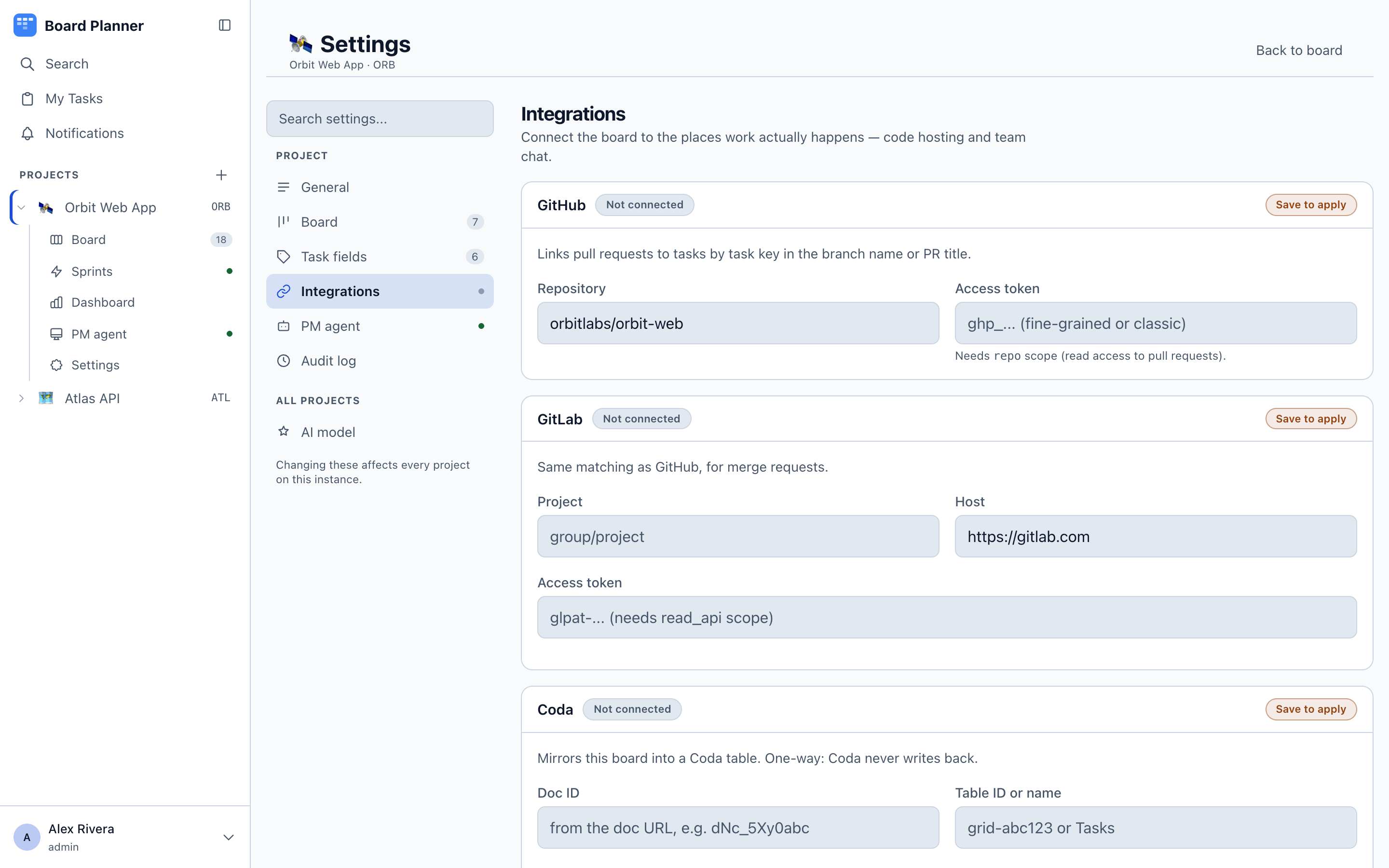
Repository
Section titled “Repository”A project names its repository once, as a URL, whoever hosts it — https://github.com/owner/repo, an ssh remote, or a self-hosted address. It is the same field pull-request linking parses and the one an execution worker is told to fetch.
Which integration applies is read off the host, not chosen from a menu. The card says which one it recognised:
| The URL’s host | Recognised as |
|---|---|
github.com |
GitHub |
gitlab.com |
GitLab |
| the same host as the GitLab host below | GitLab — this is how a self-hosted instance is recognised |
| this instance’s own GitHub, when it runs against GitHub Enterprise | GitHub |
| anything else | nothing, and no pull requests are linked |
A self-hosted GitLab has neither github.com nor gitlab.com in its address, so it is recognised only once its GitLab host matches the repository URL. Setting that host was always required for GitLab anyway, since every API call goes through it.
GitHub Enterprise has the same problem and does not need a per-project answer: the operator has already said where GitHub is, in GITHUB_API_BASE_URL, and that host is recognised for every project on the instance. The same setting is what a project still on the old owner/repo field is resolved against, so such a project links to the corporate host rather than to github.com.
Only two spellings of that setting count as a place repositories live: a host of GitHub’s own, api.github.com or api.<tenant>.ghe.com, and Enterprise Server’s https://HOST/api/v3. A proxy in front of GitHub’s API is neither, and leaves all of this at github.com — a proxy’s address is not a repository’s, and handing it to a machine as a remote to clone would be worse than the problem.
After renaming, moving or transferring a repository, change this URL. A sync reads the address configured here, not the one the links happen to name, and it matches purely on the task key — there is no check that a pull request came from the repository you meant. Straight after a rename the old path usually still redirects to you; it stops the moment anyone creates a repository at it, and then that repository’s pull requests start arriving on your tasks. Links already on your cards survive the rename itself: a sync compares a pull request’s address, and it counts both the address the provider answers with and the one this URL would give — so the links written under the old name are still recognised as the same pull requests.
Pointing this URL at a different repository is the other case, and the same rule is what
makes it safe: the new repository’s #12 no longer takes the old one’s #12 off a card. Both
links stay, each pointing where it always did.
The price is on the rename, and only once you have changed this URL to the new name: from then on a rename looks exactly like a repoint, and links written under the old name stay beside the new ones — one pull request wearing two badges. It is the deliberate side to be wrong on. The other one deletes a link to a pull request that still exists, without saying so.
A repository somewhere else — Bitbucket, say — can be stored and used by a worker; it simply links no pull requests, and the card says so rather than failing quietly.
Below the URL is Connections: what this board sends events to and reads back from. Pasting a GitHub or GitLab address is itself what adds that connection, so there is nothing to choose from a menu; the rest — Coda, a shared team channel on Slack or Discord, and webhooks to any URL — are added here directly. With nothing connected the list says so and offers the five.
GitHub and GitLab
Section titled “GitHub and GitLab”Give each the access token it needs. Pull requests and merge requests are matched to tasks by the task key in the branch name or title — a branch called orb-14/invoice-preview links itself to ORB-14, case-insensitively. Linked pull requests then appear on the card, in the list’s PR column and in the task’s Linked work, with their state — and, for GitHub, what their build says.
For GitLab, a task also shows its related branches and commits. GitLab pipelines are not read, so a merge request’s badge carries its own state and nothing about its build — it wears the plain #41 below whatever its pipeline is doing.
What the badge says
Section titled “What the badge says”For a GitHub pull request that is still open, the badge carries what continuous integration says about its head commit. Both of GitHub’s mechanisms are read — check runs, which is what GitHub Actions and most apps post, and the older commit statuses that many external services still use — and reduced to one answer:
| Badge | Means |
|---|---|
#41 |
Open, and nothing has run against this commit — or it is a GitLab merge request, whose pipeline is not read. |
#41 ● amber |
A check is still running. |
#41 ✓ green |
Nothing failed. A workflow whose every job was skipped by a path filter counts — nothing blocked the merge, which is what the tick means. |
#41 ✕ red |
Something failed. |
#41 ? |
The checks have not been read — see below. |
#41 purple, merge icon |
Merged. |
#41 ⊘ |
Closed without merging. |
A failure outranks a check that is still running: once a job has failed the answer is known, and a badge that kept spinning would tell you to wait for news that has arrived. A merge outranks everything — a red build on work that shipped last week is not news.
Hovering names the pull request and the check that decided the state, so a red badge tells you which job failed without opening GitHub. In the list, clicking the badge opens the pull request in a new tab.
? is not an error. It means this instance has not read the checks, chiefly for one of two reasons: it could not reach GitHub, or the sync’s cap was reached and this pull request was not among the ones it asked about. It never means a build failed. Where a previous answer is still good — same commit, and the outcome had finished — that answer is kept rather than replaced by ?.
The cap is twenty per sync, most recently updated first — and it counts only pull requests that are open and matched to a task, not every open pull request in the repository. A repository with sixty open pull requests of which eight name a task key never reaches it. A task’s own Refresh PR status asks about that task’s pull requests on top of the twenty, which is what makes the guarantee below true.
Keeping it current
Section titled “Keeping it current”Three things refresh it. All three read the same window — every open pull request, up to a hundred, plus the thirty most recently updated closed ones — and update every task they match; the difference between them is which tasks they may move.
- Sync pull requests now, in this panel. Moves every eligible task on the board (see below).
- Refresh PR status on a task’s Linked work, which is guaranteed to look at that task’s pull requests however busy the board is, and may move only that task. It appears once the task has at least one linked GitHub pull request — before that, and on a GitLab-only task, use the button in this panel.
- A background sync, every five minutes by default (
GITHUB_SYNC_TICK_MS; see Configuration). It refreshes what the badges show and moves nothing: a column change writes a line into a task’s history, and an unattended sync has no author to put there.
Which links a sync removes
Section titled “Which links a sync removes”A sync reads a window, not the whole history: GitHub answers with the open pull requests plus the thirty most recently updated closed ones. So “this sync did not see it” and “this is not that task’s any more” are different facts, and only the second one removes a link.
- A pull request the sync did not see at all — merged last quarter, long out of the window — is left where it is. Absence from one round is not evidence about anything, so a task keeps such a link however many newer pull requests it collects.
- A pull request the sync saw and gave to somebody else — or to nobody is removed from the task that held it. That is what happens when somebody retitles a pull request from one key to another, and equally when a rename leaves it naming no task at all.
So a link disappears only when this round’s fetch contradicts it. When you press the button the toast says how many were unlinked; the GitHub background sync says nothing, so a removal it makes is one you will only notice by the link being gone.
One removal nobody asks for, and one that never comes:
- Links from a repository you pointed the board away from go only where the new repository’s numbering reaches a number an old link already holds, while that number is still inside the window. Point a board at a busy repository whose numbering is in the thousands and the old low-numbered links are never reached. So links can start disappearing weeks after a repoint, with nothing having changed at the provider and — if a background tick got there first — no message at all. Worth knowing before you go looking for the change that caused it.
- A link the rule never reaches stays on the card, and there is no way to take one off a task by hand. A pull request deleted at the provider is one such case: it is missing from a round’s answer in exactly the way an old one is, and nothing can tell the two apart.
One thing to expect the first time you sync after upgrading: links the older, looser matcher had created — a branch merely containing a key, as below — are contradicted by the first round that sees them, so a board nobody has touched can report a few unlinked.
A task key is matched at a word boundary, so a branch called feat/websubp-99 is not read as
BP-99 — it is websubp, not BP. Before, a name that merely contained a key could take a pull
request off the card it belonged to, and a two-letter key turns up inside ordinary words often.
Finished pull requests are never asked about again — their build is history and the badge shows the merge — which is the largest single saving. It is not free, though, and the arithmetic is worth knowing before you leave the background sync on.
What this costs against your rate limit
Section titled “What this costs against your rate limit”One tick costs at most 82 requests per project — two for the pull-request listing, then up to four per open matched pull request up to the cap — which is about 1,000 an hour at the default interval. The ordinary case, where a commit’s checks fit in one page, is 42 and about 500.
The number that matters is what those are counted against: GitHub’s 5,000 an hour is per account, not per token and not per project. So one board is roughly a fifth of one person’s hourly budget — and the same personal access token pasted into several boards shares one budget, with nothing in the product warning you that it has been. Running several boards off one account, either raise GITHUB_SYNC_TICK_MS or give each board a token of its own.
A merge can move the task
Section titled “A merge can move the task”When a sync finds a merged pull request for a task that is sitting in In Review, it moves that task to Ready to Test and records the move in the task’s history under whoever asked for the sync.
All four conditions have to hold: a person asked (the background sync never moves anything), the pull request is merged rather than merely closed, the task is in the in_review column, and the project still has a ready_to_test one.
Those are column ids, not labels, and the difference matters in the reassuring direction: renaming a column changes nothing here. A column keeps its id for life, so a board that renamed “In Review” to “Code Review” still moves its tasks exactly as before. What does opt a board out, silently, is removing or replacing either column — the sync then reports success and moves nothing.
Slack and Discord
Section titled “Slack and Discord”Add a webhook URL per channel and choose which events it receives — task created, status changed, comment added, task linked, task unlinked. A project can have up to 20 channels, each with its own event selection, and each can be switched off without deleting it.
The address must be https and reachable on the public internet. A plain-http address, a local name such as localhost, or a private-network IP is refused when you save it, with the reason on screen. A name that resolves to a private address is caught when a delivery is attempted, and nothing is sent. A channel keeps no delivery status, so one the rule refuses simply receives nothing.
What a task title or a comment says is posted as text: Slack link syntax and Discord markdown are escaped, and Discord is told not to ping anyone, so nobody who can write a task can disguise a link as other text or ping the team’s channel with @everyone. A plain address in the text is still shown as the address it is.
An incoming-webhook URL is a credential in its own right: anyone holding it can post into that channel as the integration, with no other sign-in. So the instance stores it encrypted, and never hands it back — once saved, the row shows the host and the last few characters, and Replace is the only way to change it. An instance with no ENCRYPTION_KEY cannot store one at all and says so instead of saving it in the clear.
Channels that already exist keep the events they already had. task linked and task unlinked were added later, and a channel only picks up an event when somebody ticks it — so after an upgrade nothing starts posting more than it did. Newly added channels start with all five ticked.
If you are upgrading an instance that already had channels, their URLs were stored as plain text. Editing a channel rewrites it, and an administrator can sweep the rest in one go — see Upgrading an instance that already had team channels. Either way those URLs have already been written to backups, so revoke and re-issue them in Slack or Discord if that matters to you.
Webhooks
Section titled “Webhooks”For anything else, a plain webhook: your URL, your choice of events. Same event set, no formatting applied — the payload is yours to interpret. A project can have up to 20 webhooks. Webhook and channel URLs can be up to 2,048 characters, and a channel name up to 100.
The same address rule applies. A webhook the rule refuses at delivery — one whose name resolves to a private address, or one saved before the check existed — is never sent to, and after the next event it receives, its row says Last delivery failed (time) — Blocked destination.
One event is delivered to at most four destinations at a time, the rest as those finish, so a board with many webhooks spreads its deliveries out rather than sending them all at once.
Verifying that a delivery came from us
Section titled “Verifying that a delivery came from us”When the instance has WEBHOOK_SIGNING_SECRET set, every delivery carries two headers:
| Header | Value |
|---|---|
x-boardplanner-timestamp |
Unix seconds at the moment of sending. |
x-boardplanner-signature |
t=<timestamp>,v1=<hmac> |
The HMAC is SHA-256 over `${timestamp}.${body}` — the raw request body, with the timestamp inside the signed material rather than beside it, so the header cannot be rewritten to replay an old delivery. Recompute it with your copy of the secret and compare; reject anything whose timestamp is older than you are willing to accept.
An instance with no secret configured sends the delivery unsigned rather than not at all, so switching the secret on is safe for receivers that do not check yet — but a receiver that does check should refuse an unsigned delivery once you have set one.
A Coda document and table can be connected, for teams whose planning input arrives there.
Two identifiers, both from Coda: the Doc ID is the code in the document’s URL, such as dNc_5Xy0abc, and the Table ID or name is the table inside it. With an API token alongside them the connection reads that table and writes back.