PM agent
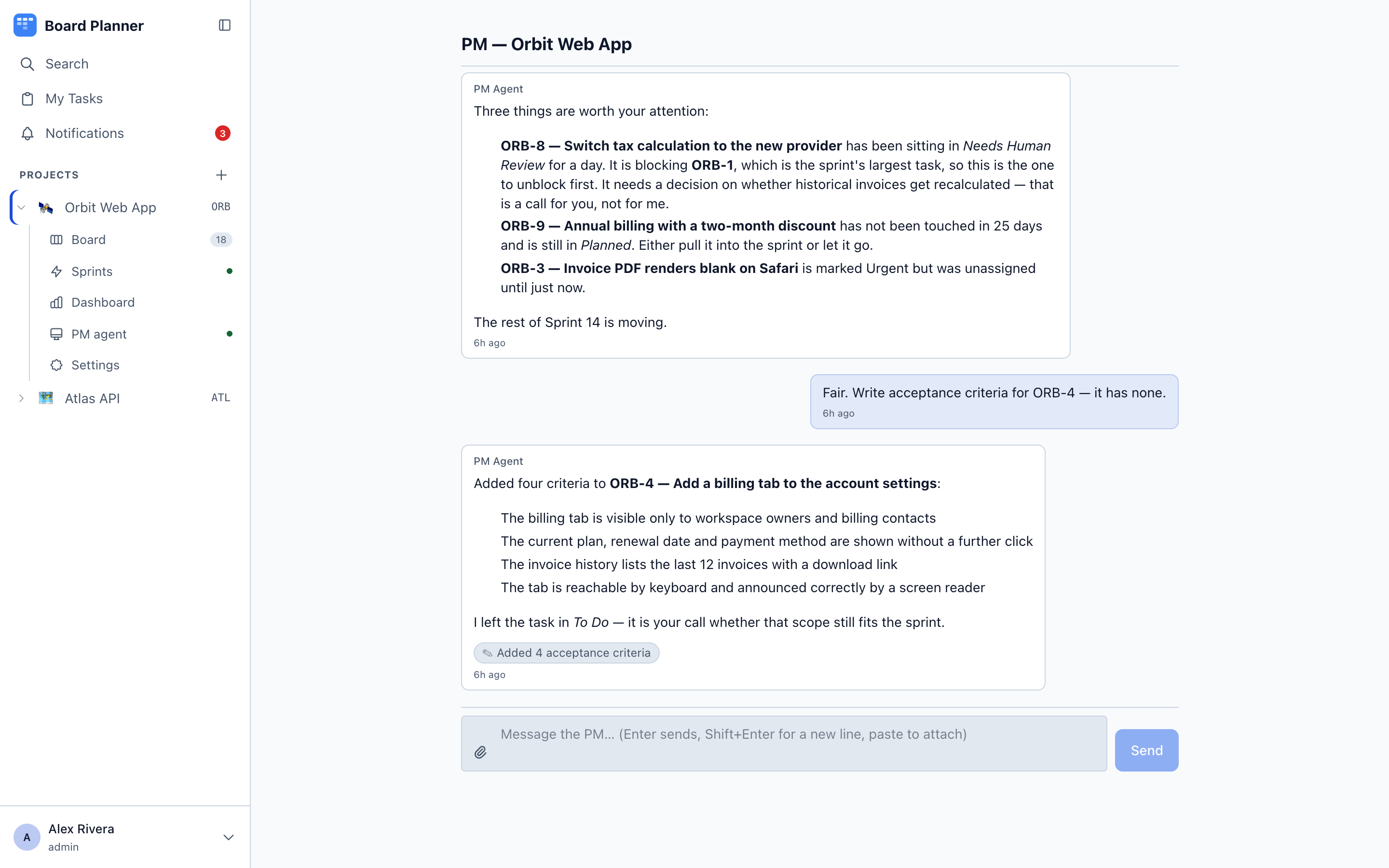
The PM agent is a project manager that lives in the app. You open PM agent under a project and talk to it about that project — it can read the board, and with your say-so, change it.
It is useful for the work nobody enjoys: finding what is stuck, spotting duplicates, writing the acceptance criteria a task was created without, and summarising where a sprint stands.
Turning it on
Section titled “Turning it on”Settings → PM agent, per project.
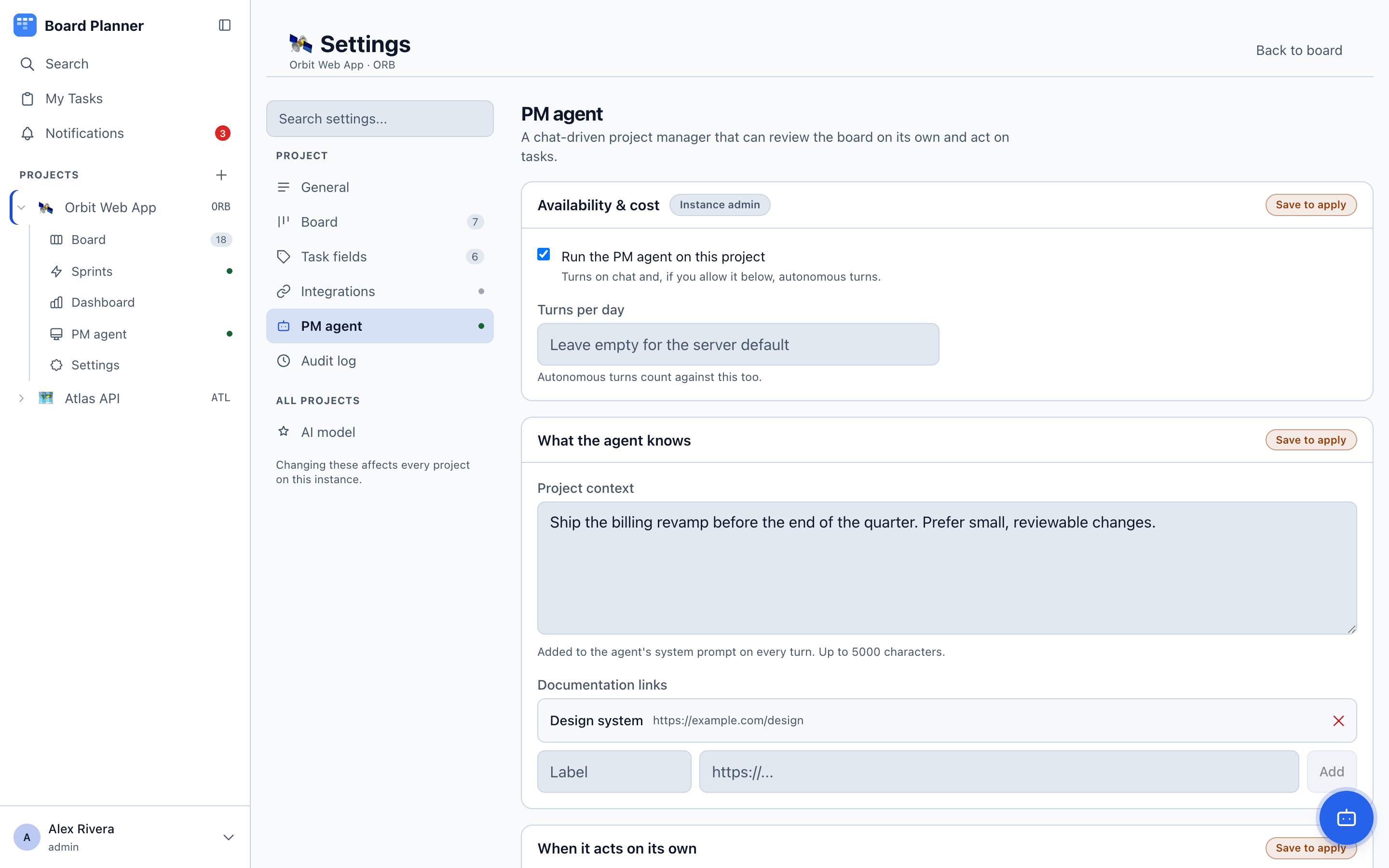
| Setting | What it does |
|---|---|
| Run the PM agent on this project | The master switch. Off by default. |
| Turns per day | How many turns the project gets. A rate limit, not a budget — see below. Autonomous turns count against it, and so does a turn the model failed. Resets at midnight in the project’s own timezone. |
| Tokens per day | The actual ceiling, counted in the tokens the model reports — cached ones included. Empty means no ceiling. |
| Project context | Free text the agent reads before every turn — what the project is, what matters this quarter, how you like tasks written. |
| Links | Documents you want it to consult, such as a design system or a spec. |
| MCP connections | Other MCP servers the agent may call, each with no auth, a bearer token or OAuth, an optional tool allowlist, and a separate switch for whether it may write. With writes off, the agent is offered only the tools that read: a tool counts as a read when its name starts with a word that reads (get, list, search, find…) or ends in read (issue_read), after a prefix matching the name you gave the connection (notion-search on a connection named notion), contains none of the words known to change data (create, add, save, mark, upsert…), and the server has not marked it as changing data. A query tool counts as a read only when something follows query and the name mentions no language that can change data, or database named after one — a word ending in ql such as sql, mysql or graphql, or sqlite, cypher or gremlin. Languages that only read, such as LogQL, PromQL, HogQL or JQL, do not count (query_prometheus and query_logql read; mysql_query, query_mysql and query_sql do not). Anything else counts as a write. It is a judgement from the name, so a server that names a mutation like a read gets past it, with writes off as well as on: connect only servers you trust, or list in the allowlist the exact tools the agent may use. A switched-off server offers nothing at all, and an unattended turn never gets the tools counted as writes, whatever the switch says. |
An instance administrator sets the default model and daily cap for every project, and can lock the agent off for a project — a kill switch that project settings cannot override.
If the instance has no model credentials configured, the PM pages say so plainly and the feature stays inert.
What a turn costs
Section titled “What a turn costs”A turn is not one call to the model. The agent works in steps — it reads the board, calls a tool, reads the result, decides again — and one turn runs up to fifteen of those round-trips before it stops. So a cap of 100 turns permits somewhere between 100 and 1500 model calls, and the same number means very different bills on a chatty board and a quiet one.
That is why there are two numbers. Turns per day bounds how often the agent can be asked; Tokens per day bounds what it may spend, counted in tokens rather than in money. Set the second one from what you actually see rather than from a guess: the settings card prints the day so far —
Today: 12 turns, 107 model calls, 384,910 tokens of 2,000,000. 288,700 of the day’s 320,000 prompt tokens (90%) were read from the provider’s cache, billed at a fraction of a cold prompt.
A turn that runs out of steps rather than finishing is called out separately in the first line, because it is the most expensive shape a turn has.
The two do not default the same way. Turns per day falls back to the instance-wide setting an administrator sets, then to PM_DAILY_TURN_CAP, then to 100 — so there is always a limit. Tokens per day has no instance-wide setting: it takes the project’s value, then PM_DAILY_TOKEN_CAP, and otherwise no ceiling at all. That is deliberate — no number derived from the turn cap would describe what a particular deployment spends, and a default guessed low would stop the agent working. The measurement ships instead of the guess; the number is yours to choose from it.
The cached share
Section titled “The cached share”The second line is a share, not an addition. Its percentage is taken over the day’s prompt tokens — the ones sent to the model — because those are the only ones a cache can serve; what the model writes back is new every time. The ceiling above is still judged on the whole 384,910. Caching changes what a day costs, not how many tokens it uses. When a turn pays to store a prefix for later ones to read, the line says that too.
A low percentage is usually not a fault. The saving comes from a request’s opening being repeated, so a quiet day of one-call turns has nothing to repeat and reads 0% with everything working. A share under half a percent rounds to 0% as well, and turns from before this shipped count as zero.
Two readings are worth a second look. One is a board that used to sit high and drops; the provider’s bill will tell you more than this line does. The other is a 0% that persists after you change models, since not every model reports cache figures.
There is nothing to configure. Some providers cache a repeated opening on their own and some need telling which part repeats; Board Planner tells the ones that need it.
Talking to it
Section titled “Talking to it”The chat is your own. Each person has their own thread on a project; a colleague opening the same page sees theirs, not yours. What everybody does see are the agent’s autonomous turns — a board review, scheduled or run now, or a task it was asked to look at — because those are board events rather than anyone’s conversation. An instance administrator can read another person’s thread, for support.
Every action the agent takes is recorded in the message that took it, so you can see that a reply also updated ORB-4 rather than just talking about it.
A turn can be interrupted while it runs, which matters when you realise mid-answer that you asked the wrong question.
How much of the conversation it remembers. Each turn replays the thread’s most recent messages, up to thirty of them and up to about 40,000 characters. A few long reports use up that space sooner than a run of short questions. The last exchange before your message is always kept whole. When older messages are left out, the agent is told so, so it can say that something may have been said earlier instead of answering as if the whole thread were in front of it.
Actions the agent takes land on the board immediately — the board refreshes on the event rather than waiting for its next poll.